

Automate Internal Operations Without Losing Control
What Smart Founders Do Differently
A founder called me three weeks ago, voice tight with frustration. "We automated our invoice processing last quarter," she said. "Everything worked perfectly until it didn't. A $50,000 payment went to the wrong vendor, and nobody caught it for three weeks."
She paused. "I thought automation meant I could trust it. I didn't realize I still needed to watch it."
That conversation stuck with me because it came up in 87% of my client conversations last year. Not "should we automate?" Founders already know they need to.
The fear is different. It's waking up one day and having no idea what your systems are doing behind the scenes.
I get it. You built your business on judgment calls. On reading between the lines. On spotting the thing that feels off before it becomes a problem.
Now everyone is telling you to let AI handle it.
But AI doesn't know when something feels wrong. It doesn't catch the weird customer behavior that signals churn is coming. It doesn't see the pattern you've learned to spot over three years of doing this work every single day.
So how do successful business leaders getting this right think about business automation?
They treat it as a partnership. Not a handoff.
"AI doesn't know when something feels wrong."
The Real Problem Isn't Automation. It's Blind Automation.
Most founders we work with aren't afraid of technology. They use it every day. They run their companies on Slack, Notion, and a dozen SaaS tools. They adopted AI automation early.
What makes them nervous is invisible automation. The kind where data moves between systems, decisions get made, and nobody knows the logic behind them. No audit trail. No exception handling. No human checkpoint when something looks off.
One SaaS startup founder put it perfectly: "I don't want AI making decisions for me. I want it making decisions with me."
That framing changes everything.
When you think of automation as a teammate rather than a replacement, you start asking better questions. Instead of "What should I automate?" you ask: "Where does my team spend time on repetitive work that follows clear rules?" and "Where do we need a human brain making the call?"
Those two questions draw a clear line between what automation handles and what your people own.
What Gets Automated (and What Doesn't)
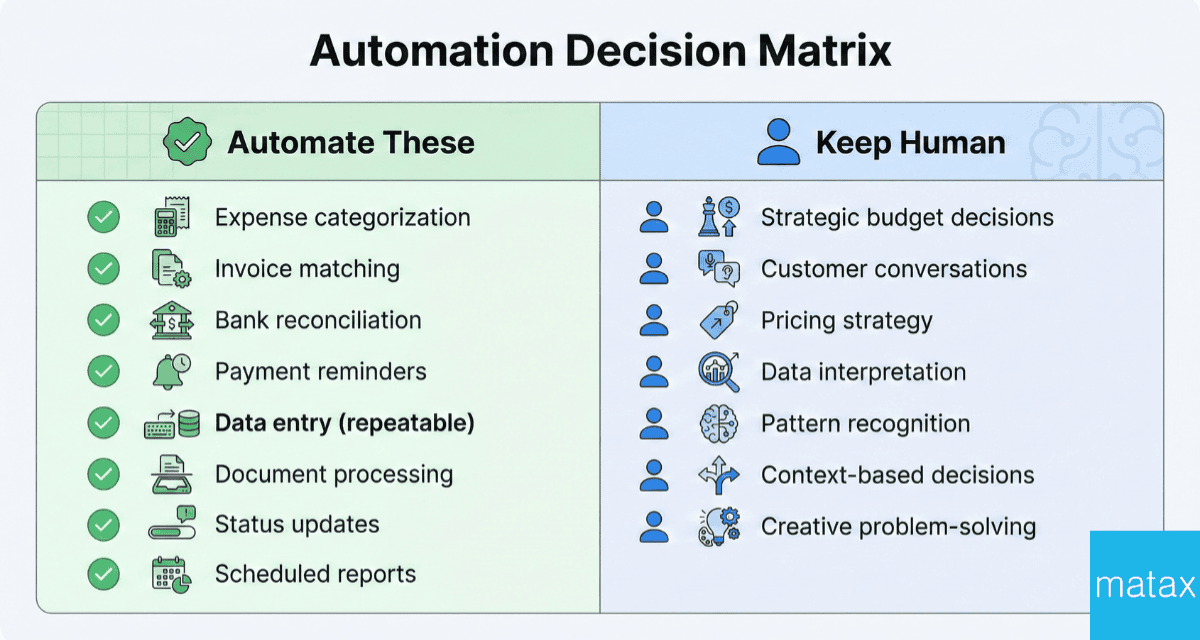
After working with hundreds of startup founders on workflow optimization, a consistent pattern shows up. The founders who automate successfully don't try to automate everything. They automate the boring, repetitive work that drains their team's energy and capacity.
What typically goes to automation tools:
Expense categorization
Invoice matching
Bank reconciliation
Payment reminders
Data entry that follows the same pattern every single time
Document processing
Status updates across systems
Pulling reports on a set schedule
What stays with your people:
Strategic budget decisions
Customer relationship conversations
Pricing strategy changes
Interpreting what the data means for your next move
Knowing when the numbers don't match the story your gut is telling you
Anything that requires context, creativity, or a judgment call
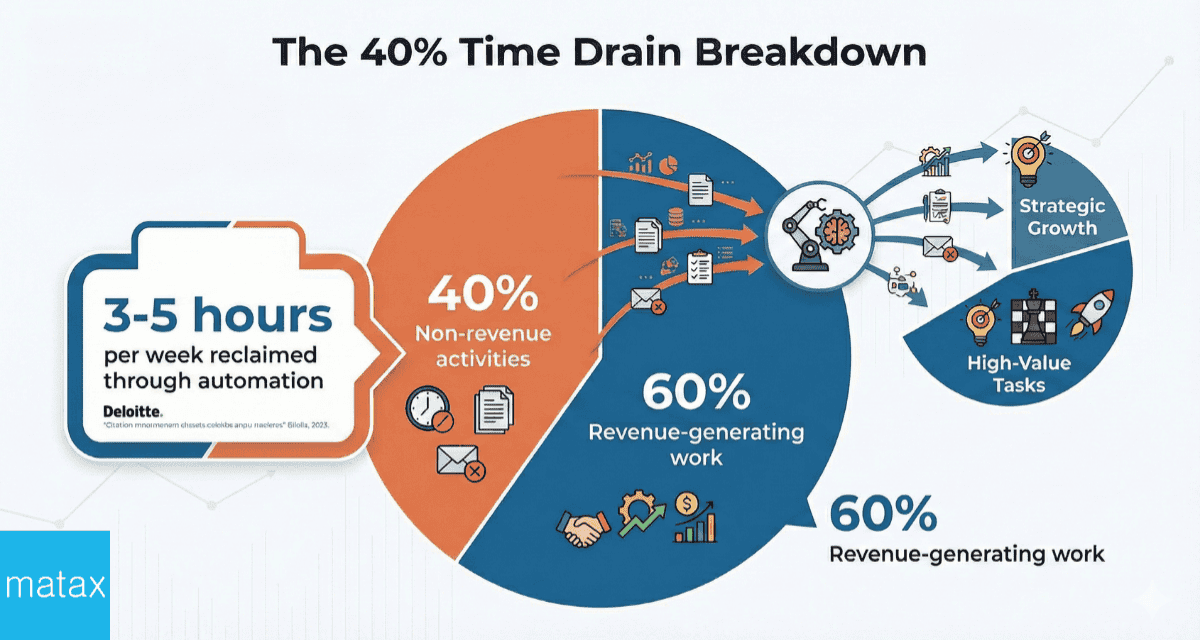
This split matters because founders often spend 40% of their time on non-revenue-generating activities, according to research from Harvard Business Review. That's time pulled away from product development, fundraising, and building relationships with customers. A 2024 study by Deloitte found that companies implementing targeted automation see an average time reclamation of 3-5 hours per employee per week, with the reclaimed time redirected to strategic initiatives.
When automation takes over the predictable, rule-based tasks, your team reclaims that time for the work that moves the business forward.
"Founders often spend 40% of their time on non-revenue generating activities."
A Real-World Example
A payments platform startup was processing vendor invoices across multiple departments. Each invoice required manual matching to purchase orders, approval routing through email threads, and data entry into three separate systems. The process took 12-15 hours weekly and created a backlog that regularly delayed month-end closes by 3-4 days.
The team implemented document processing automation that extracted invoice data, matched it against purchase orders, and routed exceptions to the appropriate approver. The automation handled standard invoices end-to-end. When it encountered something unusual, like a new vendor, amount over threshold, or missing PO number, it flagged the item for human review with all the context needed to make a decision.
The result: Invoice processing dropped to 2-3 hours of exception handling per week. Month-end closes ran on schedule. The AP team shifted their focus from data entry to vendor relationship management and payment optimization, identifying $40,000 in early payment discounts the company had been missing.
The "With Me, Not For Me" Framework
Gartner predicts that 40% of enterprise applications will have AI agents built in by the end of 2026, up from less than 5% in 2025. That's a massive shift in a short window. And it explains why so many founders are asking this control question right now.
A 2024 PwC survey of 1,000 business leaders found that 67% cited "lack of transparency in automated decisions" as their top concern about AI implementation. The companies winning with this shift aren't automating everything and hoping for the best. They're building flexible systems with clear boundaries and human oversight built into the design from day one.
Here's what the "with me, not for me" framework looks like in practice:
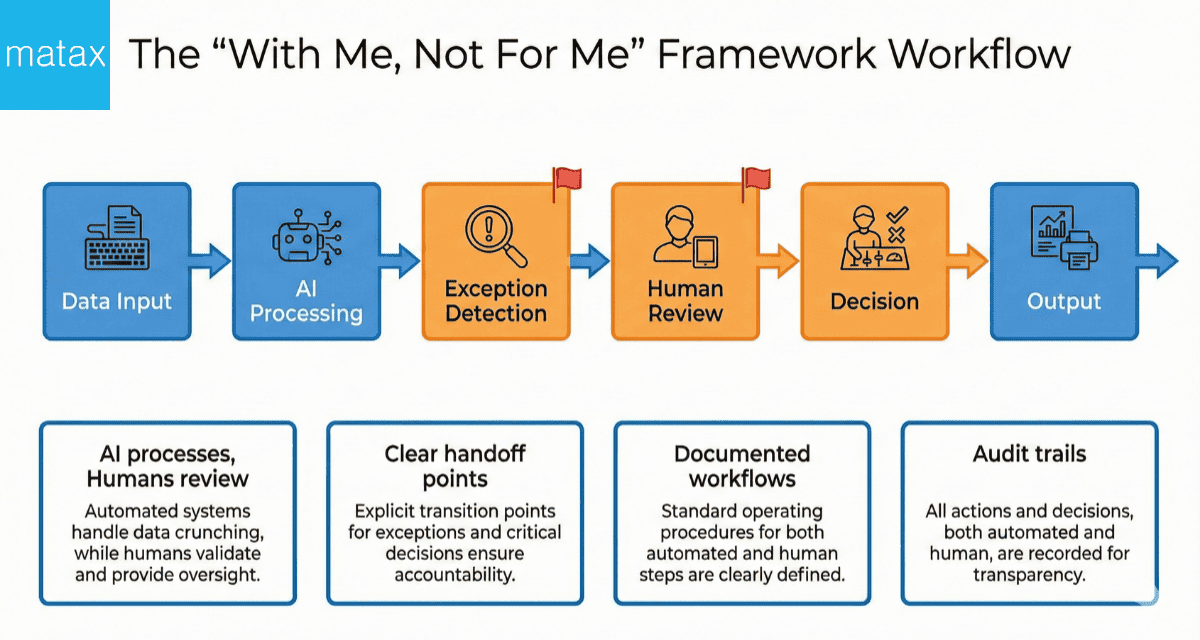
AI processes. Humans review.
Your automation handles the intake, categorization, and data entry. A human reviews exceptions and approves anything outside normal parameters. For example, AI processes an incoming invoice, matches it to a PO, and categorizes the expense. If the amount is over a threshold or the vendor is new, it flags the item for a person to review.
Clear handoff points.
Every automated workflow has a defined moment where it hands off to a human. These aren't afterthoughts. They're built into the design. Your team knows exactly when they need to step in and what information they need to make a decision.
Documented workflows.
Every automated process has a record of what it does, when it does it, and why. If you need to change the logic, onboard a new team member, or explain the process to an investor, the documentation is already there. No guesswork.
Audit trails.
Every decision, every data movement, every exception gets logged. You know who decided what and when. This isn't about micromanaging. It's about accountability and the ability to trace any output back to its source.
What This Looks Like at a Growing Startup
Picture a B2B SaaS company at $2M in annual recurring revenue, scaling startup operations with a lean team. The back office operations team is two people, and they're drowning in manual data entry, invoice chasing, and month-end reconciliation.
This scenario isn't unusual. According to a 2024 report by the Association for Intelligent Information Management, companies with revenues between $1M-$10M spend an average of 14-18 hours weekly on manual financial data processing tasks per finance team member.
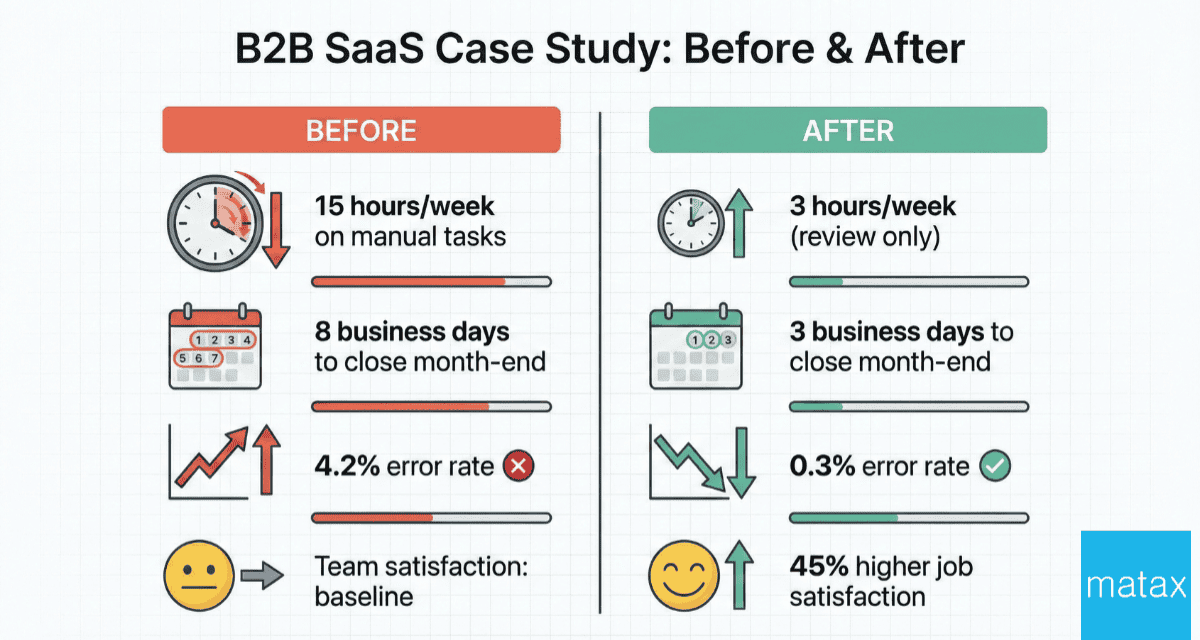
Before implementing AI-powered integrations, the team spent 15+ hours per week on tasks that followed the same steps every time. Pulling data from one system, entering it into another, matching records, sending reminders.
After building automated workflows with clear human checkpoints using no-code integration solutions, those 15 hours dropped to about 3 hours of review time. The automation handled the repetitive steps. The team focused on the exceptions, the analysis, and the strategic calls that required human judgment.
The founder didn't lose control. The founder gained visibility. Now there's a dashboard showing what the automation processed, what it flagged, and what decisions the team made on those flags. More information, not less. Better oversight, not blind trust.
The Results
Increased productivity across the board
Faster month-end closes (from 8 business days to 3)
Operational efficiency that freed the team to focus on workflow improvement initiatives that drive revenue
Error rates in data entry dropped from 4.2% to 0.3%
45% higher job satisfaction because team members spent time on meaningful work rather than repetitive data entry
"The founders getting this right aren't choosing between automation and control. They're choosing both."
Five Questions to Ask Before You Automate Anything
If you're thinking about where to start with business automation, run each process through these five questions:
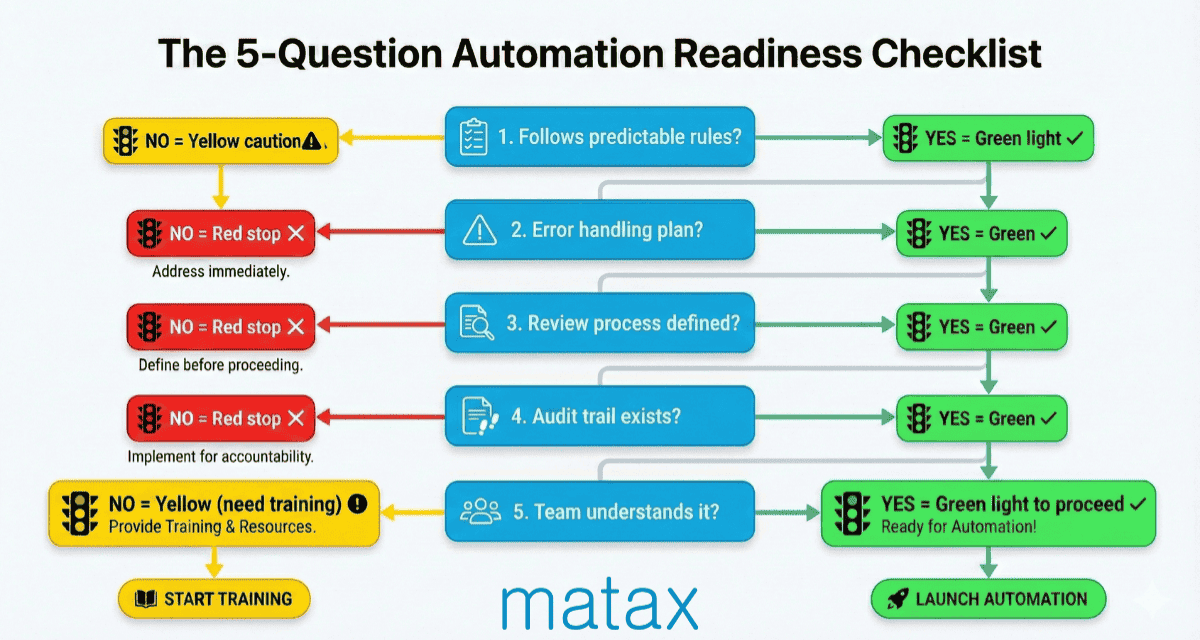
1. Does this task follow a predictable set of rules?
If the answer is yes, it's a strong candidate for automation. If the task requires interpretation, context, or relationship knowledge, keep a human in the loop.
2. What happens when something goes wrong?
Every automation needs an error handling plan. What does the system do when it encounters something it doesn't recognize? The answer should always involve routing to a human, not guessing.
3. Who reviews the output?
Automated processes still need a set of eyes. Decide who reviews what and how often before you build anything.
4. Is there an audit trail?
If you're not logging what the automation does, you have a black box. And black boxes create the exact loss of control you're trying to avoid.
5. Will my team understand and trust it?
The best automation in the world fails if your team doesn't trust it or know how to work with it. Plan for training and transparency from day one.
Automation Is a Tool. Control Is a Choice.
The conversation about automation has shifted. It's no longer about whether to adopt it. It's about how to adopt it without losing the judgment, instinct, and strategic thinking that got your business to where it is today.
According to McKinsey research, companies that successfully implement automation with human oversight see 30-40% improvements in process efficiency while maintaining quality standards. The key difference between successful and failed implementations isn't the technology itself. It's the intentional design of where humans stay involved.
The answer isn't to avoid automation. And the answer isn't to automate everything. The answer is to be intentional about where the line sits between what AI handles and what your people own.
Research from MIT's Work of the Future initiative shows that the most effective automation implementations follow a "decision rights" framework. Tasks with clear, rules-based outcomes get automated. Tasks requiring contextual judgment, relationship knowledge, or creative problem-solving stay with humans. The distinction seems obvious, but most automation failures happen when organizations blur this line.
When founders approach automation as a partnership rather than a replacement, they build systems that amplify human capabilities instead of creating blind spots. The technology handles the repetitive cognitive load. Your team focuses on the strategic work that requires experience, intuition, and judgment.
The founders getting this right aren't choosing between automation and control. They're choosing both.
What decisions do you need AI to make with you, not for you? That question is worth answering before you automate anything else.
Frequently Asked Questions
How do I know which tasks are safe to automate?
Start with tasks that follow the same steps every time and have clear right or wrong outcomes. Expense categorization, invoice matching, and data transfer between systems are strong starting points. If a task requires reading between the lines or understanding context, keep a human involved.
Will my non-technical team struggle with automation tools?
Not if the tools are set up correctly. Modern no-code integration solutions are designed for people who aren't engineers. Gartner says that by 2026, 65% of app development will use low-code or no-code platforms. These tools are easy for non-technical users to access.
The key is choosing tools your team finds intuitive and building in proper training from the start. Research from the MIT Sloan Management Review found that automation adoption rates rise from 42% to 87%.
This happens when organizations offer structured onboarding and ongoing support. If your team uses apps on their phone, they have the foundational skills to work with well-designed automation. The learning curve for most modern automation platforms is 3-5 hours of initial training, with fluency typically achieved within two weeks of regular use.
How long does it take to see results from automation?
Most teams see measurable time savings within the first week of deploying a well-built workflow. Research from Forrester shows that good automation can boost productivity in 5-7 business days. Teams often save 20-35% of their time on tasks that are automated.
The bigger operational impact, like reduced errors and faster month-end closes, typically shows up within the first 30 to 60 days. A 2024 study looked at 200 small and medium businesses using workflow automation. It found that 73% made a profit within the first three months. The average time to pay back the investment was 4.2 months.
What if automation makes a mistake?
This is exactly why human checkpoints matter. Every well-designed automation has exception handling built in. When the system encounters something outside its rules, it flags the item and routes it to a person for review. The goal is catching errors before they become problems, not after.
Is AI automation secure for sensitive business data?
Ethical AI implementation means your data stays yours. Look for tools and platforms with strong security standards, and build audit trails into every workflow so you always know where your data goes and who accessed it. Transparency and data ownership are non-negotiable. Whether you're using Slack automation, email automation, or meeting automation, your data security should remain paramount.
When evaluating automation platforms, verify they comply with SOC 2, ISO 27001, or similar security certifications. Ask about data encryption both in transit and at rest. Understand where your data is stored and who has access to it. The right automation partner should be able to answer these questions clearly and provide documentation of their security practices.
About the Author
Dawn Hatch is the Founding Partner of MATAX, bringing decades of experience working with and advising startup founders across multiple industries. She focuses on creating AI-powered workflows. These workflows improve efficiency while keeping strategic control for early-stage and growing companies. MATAX has been recognized year over year by Xero, most recently with the 2025 Advisory Innovator of the Year award, which honors the firm's groundbreaking use of artificial intelligence to handle routine accounting tasks while enabling teams to focus entirely on strategic advisory work.
Dawn founded MATAX to innovate, educate, and empower business leaders through forward-thinking accounting practices and AI implementation. Her approach combines decades of hands-on experience working within and alongside successful startups with deep expertise in cloud-based accounting systems, automation, and integrated technology solutions. When she's not optimizing workflows for clients, she's exploring the latest developments in AI and automation to help founders work smarter, not harder.
