

How to Use AI Agents to Automate Finance Workflows
Here's the short version. AI agents automate finance workflows by handling the handoffs between tasks. You stop doing them by hand.
Agents pull invoices from your inbox. They match bills to POs. They push data into your accounting platform. They flag the weird stuff for a human. They log every step.
Get the sequence right and it runs quietly in the background. Your team gets their week back. Get it wrong and you've built a fast way to mess up your books.
So What Is an AI Agent, Really?
An AI agent is small software that does one job without you clicking buttons. In accounting, it reads a document. It decides where the thing belongs. It acts, or it asks a human to check. That's it.
Good agents are narrow. Each one does a single job. Think relay team, not super-bot.
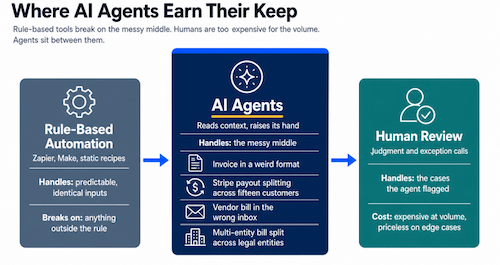
The difference from the Zapier flows you already have: an agent handles the messy middle.
An invoice in a weird format. A Stripe payout splitting across fifteen customers. A vendor bill in the wrong inbox. Rule-based tools crack. Agents read context and raise their hand when unsure.
Which Finance Workflows Should I Automate First?
Most founders get stuck here. They pick the impressive-sounding workflow.
Don't. Pick the boring one eating your team's Mondays.
We've worked with hundreds of founders at MATAX. These pay back fastest.
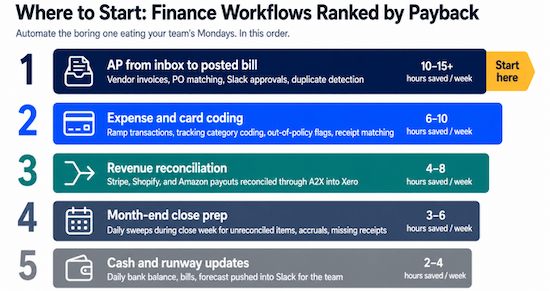
AP from inbox to posted bill
Xero already does more of this than most founders realize.
Every Xero org has a unique inbox address for vendor invoices. Xero includes Hubdoc free with every subscription. Hubdoc reads the PDF with OCR, pulls the vendor, amount, date, and line items, matches the supplier contact, and creates a draft bill with the source document attached.
If you've coded that supplier before, Xero remembers and applies the coding.
So where does the agent earn its keep? On the parts Xero and Hubdoc can't do alone.
Matching bills to POs in a non-Xero system. Routing Slack approvals by dollar threshold or department.
Detecting duplicates across forwarded inboxes. Multi-entity coding when one bill splits across legal entities. Coding to Xero tracking categories that need context beyond the invoice.
The agent also catches drafts where Hubdoc misreads a number. It sits on top of the native pipeline.
Expense and card coding
Ramp already categorizes transactions before they sync to Xero. Its ML uses the merchant, employee, memo, and your coding history. That native ramp accounting automation covers the baseline.
The agent layer catches what the Ramp sync misses.
Coding to Xero tracking categories when the answer depends on employee or receipt, not merchant. Splitting one transaction across GL accounts.
Matching non-Ramp receipts to card transactions via email automation. Flagging out-of-policy spend before it posts. Catching low-confidence Ramp codings before they pile up.
Revenue reconciliation from Stripe, Shopify, and Amazon
Running ecommerce integration alongside a subscription product burns hours here.
The agent pulls payouts. It matches them to the underlying transactions. It runs them through a2x accounting. It writes a clean journal entry into Xero accounting services.
Month-end close prep
The agent runs a scheduled daily pass during the final week of the month. Every morning it hunts for unreconciled bank and card items, surfaces accruals, checks for missing receipts, catches late-arriving prior-period bills, and drops supporting documents into the right folders.
By Monday of close week, you walk in with a one-page readiness summary. You know exactly what needs your judgment.
Cash and runway updates
The agent pulls the bank balance, posts the latest bills, updates the forecast, and pushes the view into a Slack channel. Your team sees fresh cash numbers every morning. No one touches a spreadsheet.
None of these needs the agent to be clever. They need it to be consistent.
The Order of Operations That Works
Most founders start with the wrong question. They ask which AI tool to buy.
The better question is which workflow to automate first. And in what order.
Here's the sequence we run with every client.
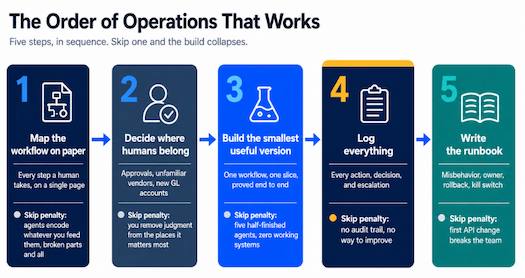
Map the workflow on paper. Write down every step a human takes. Who gets the document? Who codes it? Who approves it? Where it lands. If you can't draw it on one page, you're not ready. Agents encode whatever process you feed them, broken parts and all.
Decide where humans belong. Every workflow has checkpoints where a person makes the call. Approvals over a dollar limit. Unfamiliar vendors. A new GL account. Write these in first. Optimizing workflow isn't about removing humans. It's about putting them where judgment matters.
Build the smallest useful version. Don't automate all of AP in one project. Start with inbox-to-bill-creation. Keep approval and payment manual. Prove the agent works. Then expand.
Log everything. Every action, decision, and time the agent asked for help. That log is your audit trail. It's also how you improve. AI workflow automation and testing is a loop, not a one-time build.
Write the runbook. What happens when the agent misbehaves? Who owns the fix? What rollback looks like. If your team can't turn the agent off, the first API change will break you.
What Tools Do We Use?
Tool choices matter less than you think. Match the tool to the job.
n8n handles orchestration. This no-code integration solutions platform runs the triggers, branching, and API calls. Self-hosted or cloud, your call. n8n Workflow Automation and AI Agents gives you flexible systems for custom logic. For most Task Automation and Workflow Optimization jobs across a startup back office, n8n carries the load.
Make handles multi-step business automation for simpler jobs. Easier to stand up for a pure workflow improvement play.
Xero is the system of record. Every agent writes back into Xero. Books stay clean. Investor reporting stays honest. The auditor gets one source of truth.
A2X handles the e-commerce layer. For Shopify, Amazon, or multi-channel, the agent uses A2X's mapping for GL breakdown.
Ramp handles card and bill pay. The agent reads Ramp's categorizations and covers the edges.
Slack automation is the human-in-the-loop interface. Exceptions, approvals, and daily summaries land in the right channel. Approvals happen in line. This one choice raises team productivity more than any other change we make.
Email automation and meeting automation cover the edges. The agent watches the AP inbox, preps meeting briefs, and sends reminders so you don't have to.
The list is boring on purpose. The agent logic is where the work lives. This Workflow Automation and Integration Tools layer covers ninety percent of what most SaaS startup teams need from seed to Series B.
How Do I Keep Control?
Most founders skip this until something breaks.
An agent that posts journal entries or moves money is a real actor inside your accounting operations. It needs boundaries. Here are the guardrails we apply every time.
No agent posts into a closed period. Close date is a hard boundary.
The agent logs every action. Prompt, inputs, output, outcome. It logs every override too. Logs live somewhere you can query.
Dollar thresholds live inside the agent, not only downstream. If a bill over $5,000 needs human approval, the agent can't post it without one.
Someone reviews agent activity monthly. Which calls it got right? Which it missed. Where the thresholds need to move. This is the AI workflow automation and testing discipline that keeps the system reliable as your different business models change.
Every agent has a named human owner. When it breaks, no debate about who fixes it.
Think of an agent as a junior team member working at the speed of a thousand people. You wouldn't hire that person and stop reviewing their work.
A Word on Security (This One Matters)
An agent with API access to your Xero, Stripe, Ramp, bank feeds, and payroll holds the keys to the whole back office. Corner-cutting here doesn't save money.
No free tier automation tools in production. Ever. Free n8n cloud. Free Make. Free Zapier. Fine for prototyping. Not fine for a system that posts to your general ledger.
Free tiers typically skip SSO, encrypted credential storage, IP allow-listing, audit logs, and DPAs. Some reserve the right to use your workflow data for product development. Your supplier list and revenue schedule shouldn't sit inside that scope.
Self-hosted or paid tier with a real security posture. For n8n, that means self-hosted, or n8n Cloud Pro or Enterprise. Both give you SSO, RBAC, audit logs, and a SOC 2 posture you can share at a Series A raise.
If your automation vendor can't provide a DPA and a current SOC 2 report, don't run your startup accounting on their platform.
Encrypted credential storage, scoped and rotated. Xero, Stripe, banking, and payroll API keys live in the platform's credential vault, never in plain text, and rotate on a documented schedule. Read-only where read-only works.
Isolated environments per client. If an outside firm builds your agents, each client runs in a separate environment. Your Xero credentials should never touch another client's workflow. Cheap shops cut corners here. You won't see it unless you ask.
Audit logs shipped somewhere you own. Logs replicate to a destination you control. If your vendor has an outage, you still have the trail.
Your own AI API keys with usage monitoring. If the agent calls an LLM, use your own key. Monitor usage. Set rate limits. Don't send vendor data to an endpoint training on your inputs.
If a vendor can't answer clear questions on credential storage, DPA, SOC 2, environment isolation, and audit logs, walk.
When Are AI Agents Not the Right Answer?
Most vendors skip this part. We won't.
If your chart of accounts is a mess, an agent encodes the mess at high speed. Same for a duplicate-filled vendor master. Clean the foundation first. Workflow Automation and Management on a broken base just gives you broken numbers faster.
If your transaction volume is genuinely low, the math isn't there. An agent for twenty bills a month costs more than the two hours of human time it saves.
If your business model is still moving, wait. Building agents for a process you'll redesign in six months is expensive churn.
If no one owns the exception queue, the backlog builds. Someone has to own the human-in-the-loop work. Usually, it's an existing team member whose role shifts from data entry to oversight. That shift is where the increased productivity shows up.
How Long Does It Take?
Discovery and mapping: two to three weeks. We walk your back office operations, document what's happening, and pick one or two workflows to automate first. Output is a written spec, not a pitch deck.
Build and test the first agent: four to six weeks. It runs in shadow mode first. A human reviews every call before anything moves. Shadow stage is non-negotiable.
Cutover and monitor: two weeks. The agent goes live with full logging. The team learns to trust it. We add edge cases to the exception rules.
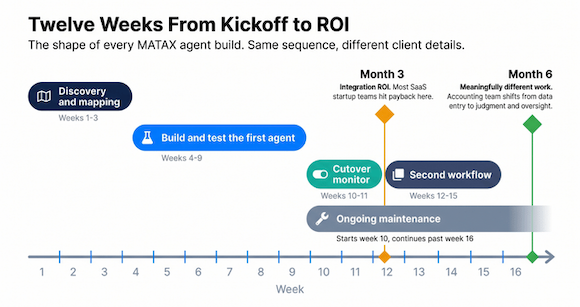
Second workflow: three to four weeks. The orchestration layer already exists.
Ongoing maintenance: four to eight hours per agent per month in the first quarter. It drops as stability improves.
Most SaaS startup teams see integration ROI by month three. By month six, your accounting team does meaningfully different work. The cost curve flattens even as volume climbs. That's the operational efficiency shift that makes this a real investment.
Frequently Asked Questions
Will AI agents replace my bookkeeper or accounting team?
No. If someone pitches that, they're wrong. Agents replace re-keying and copy-paste. Humans shift to judgment, review, and exceptions. A good build makes your team more valuable, not smaller. That's the team productivity shift behind every successful business using this well.
How do I know the agent codes things correctly?
Three ways. The agent logs its reasoning. A human reviews a sample during the first ninety days. You reconcile monthly. If the bank reconciles and subledgers tie, the agent is doing its job.
What happens when an API or invoice format changes?
The agent flags the exception and routes it to the human queue. Every change becomes a one-time rule update. We build in n8n with version control.
Is this the same as a fractional CFO?
No. A fractional CFO handles strategy, modeling, and fundraising. AI agents handle operational execution inside your accounting platform. They're complementary. A fractional CFO's job gets easier when the weekly numbers are clean.
Can I start with one agent and add more?
Yes. Build the orchestration layer once. Automate one workflow. Let it run. Then expand. Try five at once, and you'll get five half-finished agents and a team that's lost confidence.
Is there a minimum startup size?
Once your monthly transactions cross a few hundred bills or payments, or a Series A is nine months out, the math gets interesting. Before that, accounting for startups of your size is better served by tight manual processes. Every business leader we talk to gets an honest read on timing.
Will this work with my stack?
Almost always. Xero, Stripe, Ramp, Gusto or Rippling, Slack, Google Workspace, and a shared AP inbox cover ninety percent of what we see. The AI-powered integrations layer adapts to your tools.
Where to Start
Pick the workflow your team complains about every close week. The most painful one.
Map it on paper. Write down what "done correctly" looks like. Mark the pure re-keying steps. Then mark the one or two that need judgment.
That single document is what you need. We've had this conversation with hundreds of founders. Sometimes the honest answer is "yes, start with AP." Sometimes it's "clean the chart of accounts first." Sometimes it's "your volume doesn't justify it for two quarters." The answer depends on what you show us.
Want help thinking through where AI agents and AI automation fit into your scaling startup operations? We run that conversation every week.
MATAX, named Xero's 2025 Advisory Innovator of the Year, builds accounting and operations infrastructure for SaaS founders from seed through Series B. That includes the AI Workflow Automation and Testing that lets the whole thing run without manual babysitting.
Dawn Hatch is the Founding Partner of MATAX, a San Francisco-based startup operations and Xero advisory firm for founders from seed through Series B. MATAX is a two-time Xero Partner of the Year and Xero's
