

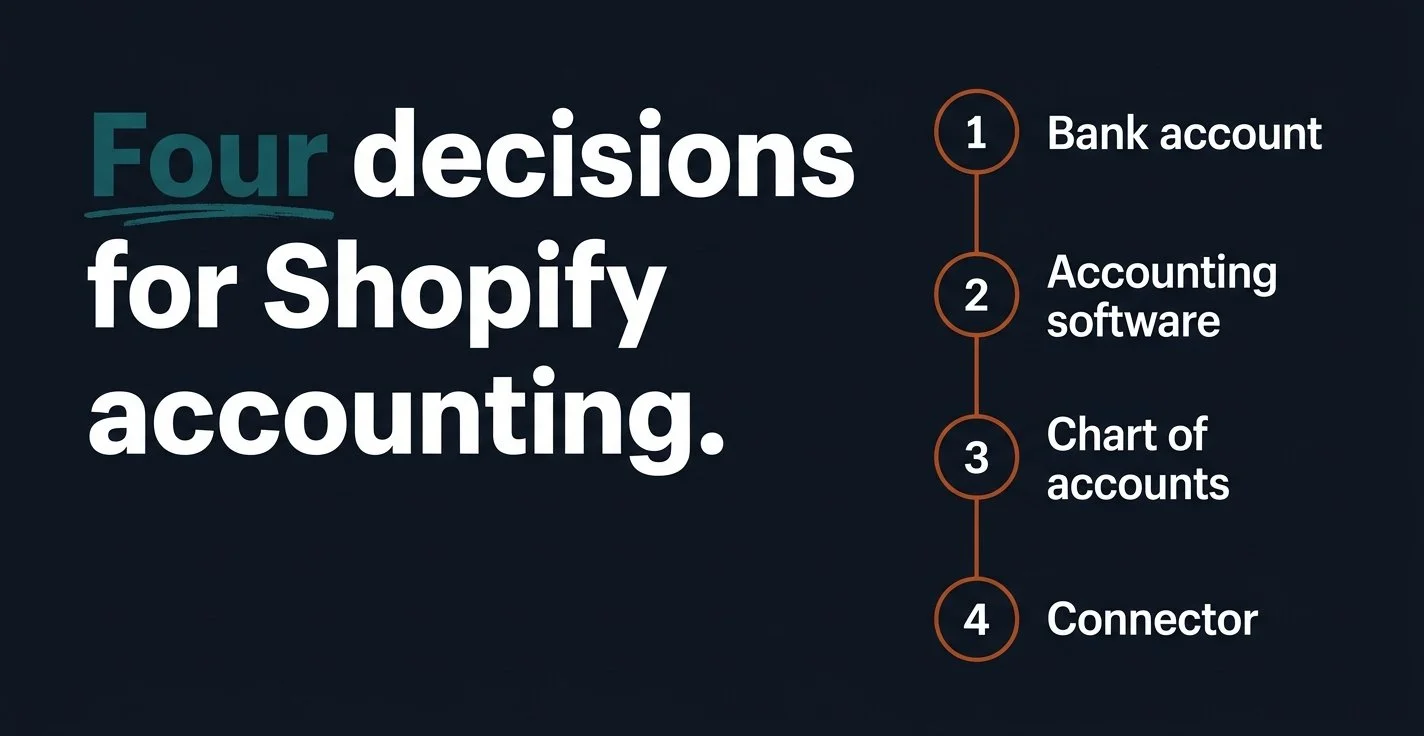
Setting up accounting for a Shopify store comes down to four decisions, made in this order: a separate business bank account, accounting software, a chart of accounts designed for ecommerce, and a connector that turns every Shopify payout into accurate, categorized entries. Make those decisions correctly in your first month and your books will match your bank. Skip one, and every month-end close turns into an investigation of why they don't.
When founders search for accounting for Shopify store setups, most of the answers they find start with the app. I'd start one step earlier, because a connector only posts what you've told it to post, and no integration can repair a chart of accounts that lumps sales, refunds, and payment fees into a single line.
We have been 100% Xero since January 2012, and the setup below is the one we use with ecommerce founders at every stage, from a pre-revenue store preparing to launch to a business processing thousands of orders a month.
Why doesn't my Shopify payout match my sales?
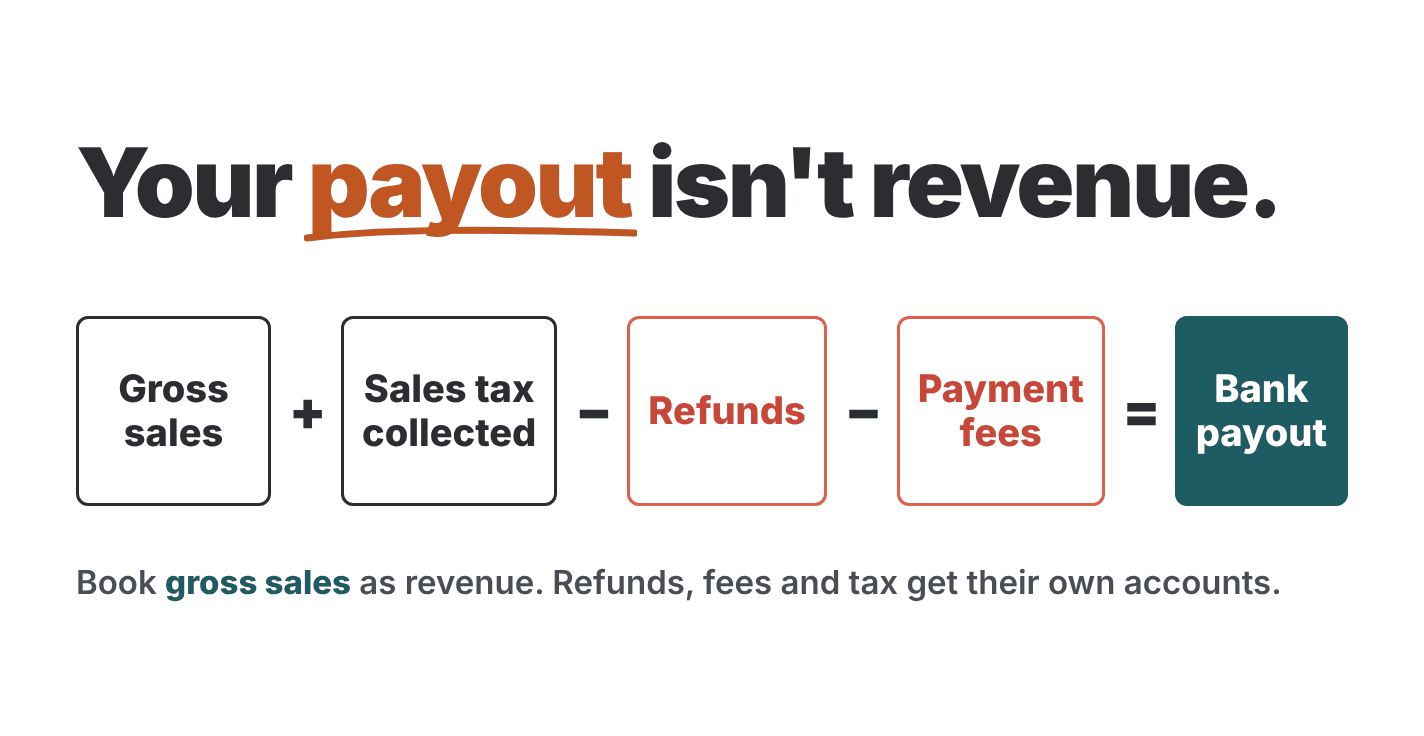
Your Shopify payout is what's left after the deductions. Shopify takes your gross sales for a group of days, subtracts refunds, payment processing fees, and adjustments, and deposits whatever remains, so a single deposit can include orders from three or four different days.
If you record each deposit as revenue, your revenue is understated by the total of your fees and refunds, your fee expense disappears completely, and the sales tax you collected on behalf of the state ends up classified as income.
This is the most common problem we find when a founder hands us their first year of e-commerce bookkeeping. The deposits look organized, and the bank reconciles, but the profit and loss statement is off by thousands of dollars, and nobody notices until an investor or a tax preparer starts asking detailed questions.
The solution is to record what actually happened instead of what landed in the bank. Gross sales go to revenue, payment fees go to an expense account, refunds go to their own revenue account, and collected tax goes to a liability, so that the individual pieces add up exactly to the deposit.
What accounts does a Shopify store need?
Your chart of accounts is the list of categories your accounting software sorts every transaction into. For a Shopify store, the default list that comes with most accounting software is too limited, so you'll want these accounts from the first day:
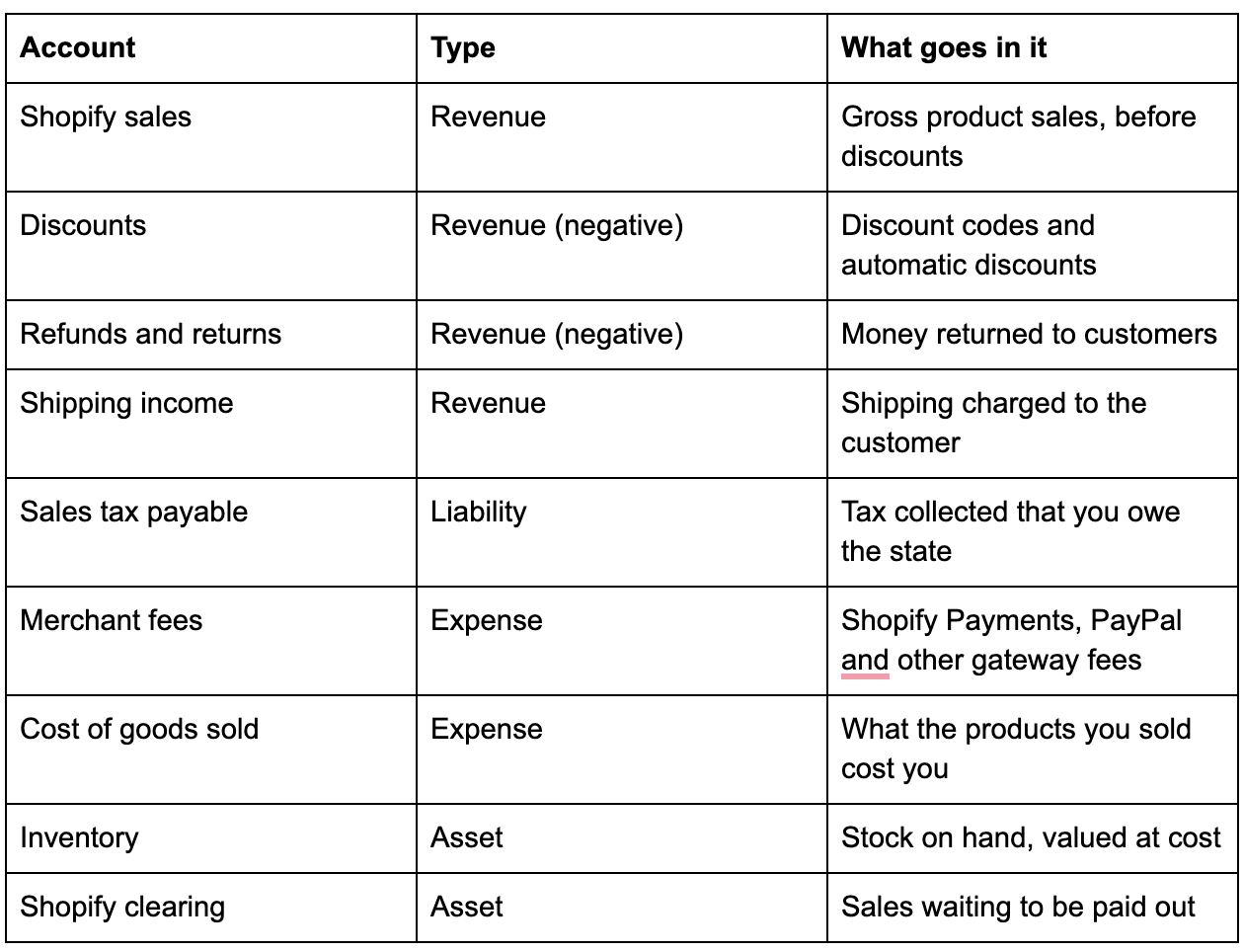
Two of these accounts do most of the work. The clearing account holds sales that have happened but haven't reached your bank, so a payout that crosses month-end still lands in the correct period. Cost of goods sold is what converts revenue into gross margin, which is the first number almost every investor asks an e-commerce founder about.
If you sell on more than one channel, create a separate sales account for each channel. You'll want to compare Shopify and Amazon performance side by side instead of looking at one blended revenue figure that hides which channel is actually profitable.
Should I use Xero's Shopify integration or A2X?
Both options connect Shopify to Xero, but they post your data differently, and that difference determines which one fits your store.
Xero's own Shopify integration is free on all Xero plans. According to its Xero App Store listing, it synchronizes sales, payouts, fees, and taxes, lets you choose between a daily summary and an individual transaction for every sale, and automatically matches Shopify Payments payouts to your bank feed.
A2X accounting works one payout at a time. According to A2X's own documentation, it posts a single summarized invoice to Xero for each payout, and once you approve that invoice, Xero matches it to the corresponding deposit in your bank feed. A2X also supports Amazon and several other sales channels inside the same Xero organization.
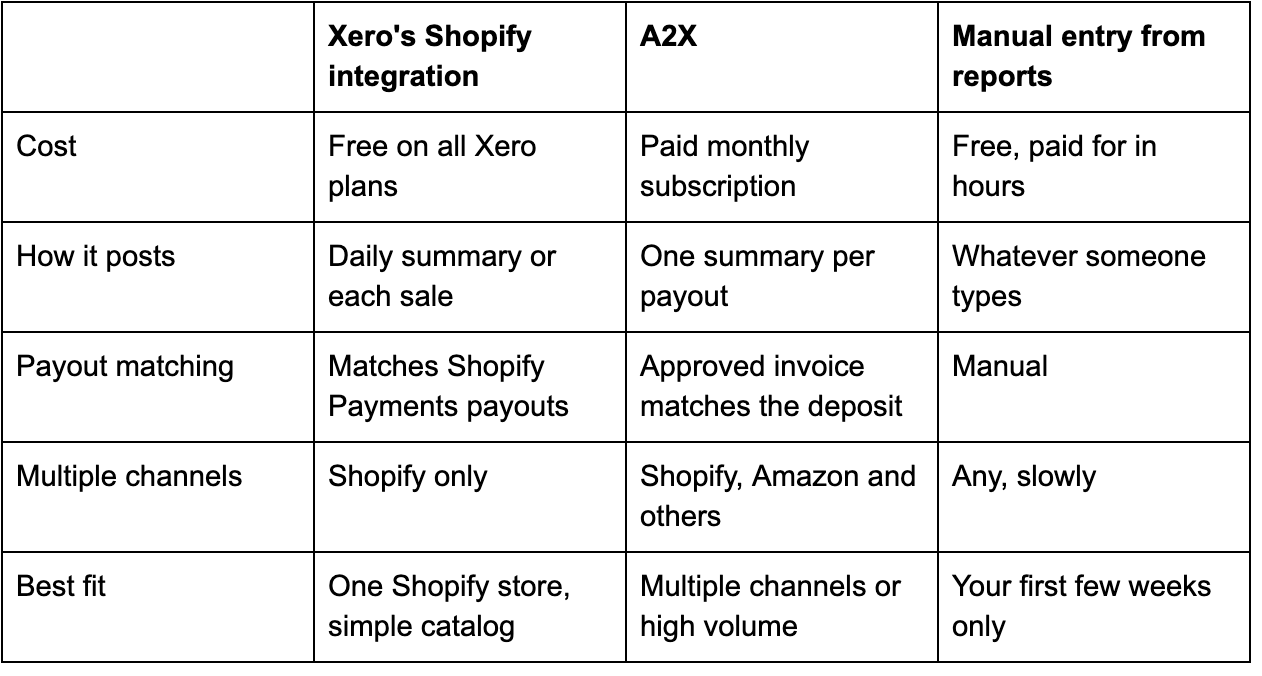
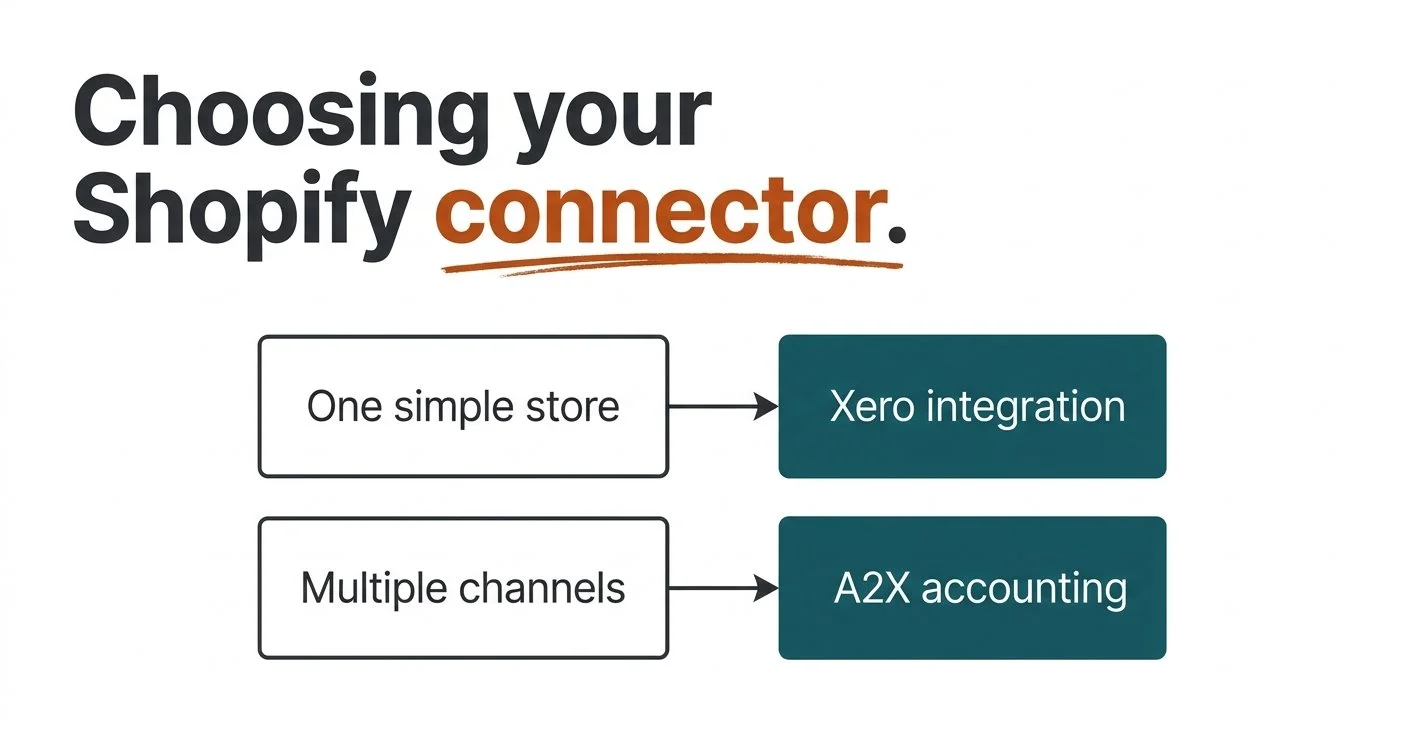
Here's how I'd decide. If you sell only on Shopify and your catalog is simple, start with the free integration. If you sell on Shopify and Amazon, or you want one clean entry for every deposit with nothing left unexplained, choose A2X. Whichever connector you choose, switch to summarized entries instead of individual orders once you pass a few hundred orders a month, because your ledger stays readable and your monthly close gets noticeably faster.
How do I set up Shopify accounting step by step?
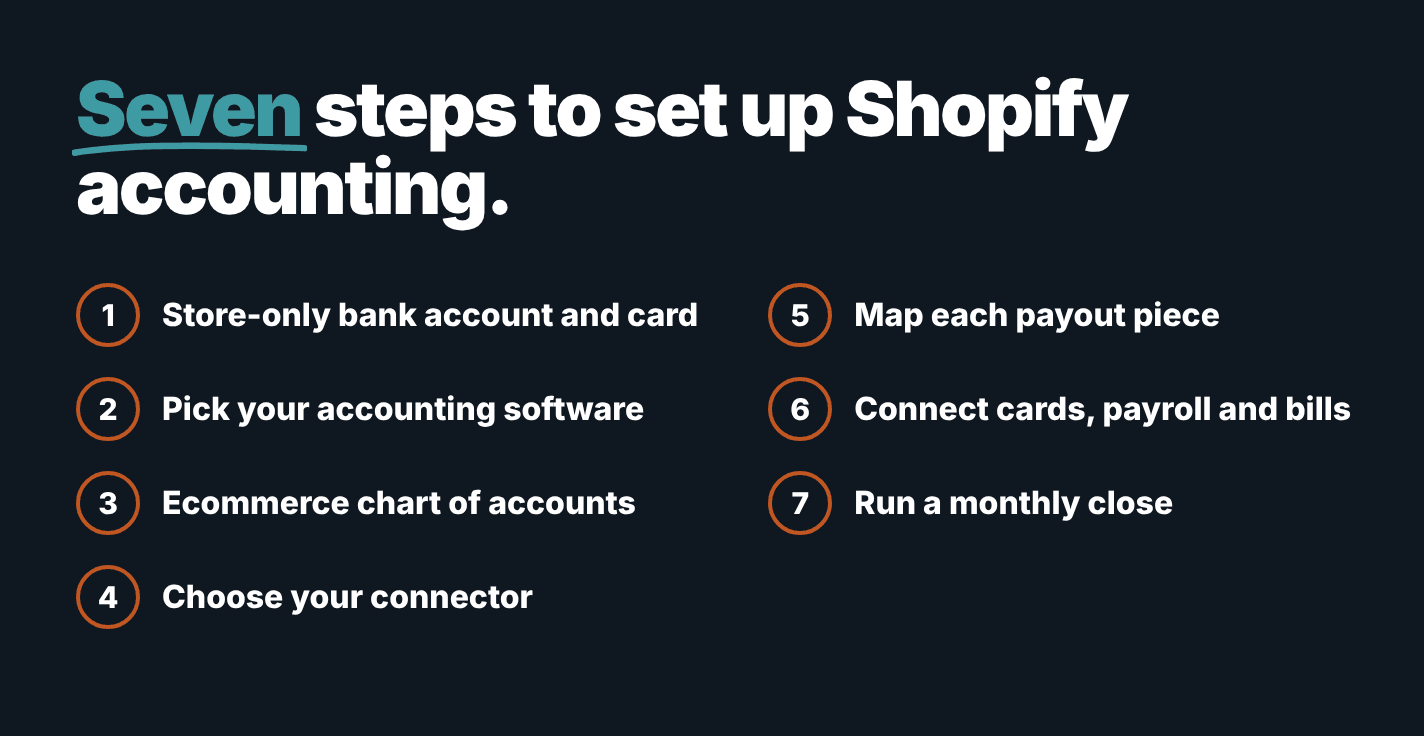
We follow this sequence with every ecommerce client, and each step depends on the one before it.
Open a business bank account and credit card that only the store uses. Mixed personal and business spending is the first thing that slows down a monthly close.
Choose your accounting software. We use Xero exclusively, and you should decide between cash and accrual accounting with your tax preparer before posting anything.
Build an e-commerce chart of accounts. Use the table above, and add a separate sales account for every additional channel.
Choose your connector. Use Xero's free integration for one simple store, and A2X for multiple channels or higher order volume.
Map every payout component to an account. Sales, discounts, refunds, shipping, tax, and fees each need a destination, and then you should test one complete month against your bank statement.
Connect the rest of your operating stack. Your company cards, payroll, and bill capture should all feed Xero automatically, so nobody retypes a receipt.
Establish a monthly close routine. Reconcile payouts, review cost of goods sold, compare sales tax payable against Shopify's tax report, and then read your gross margin.
Step six is where most stores lose hours every month without realizing it. Ramp, for example, synchronizes card transactions to Xero natively, so ramp accounting automation is a configuration task instead of a project, and a document processing tool can read supplier bills directly into Xero. When a process still runs by hand, a no-code automation tool like n8n can move information between applications that don't communicate with each other.
That's system integration at its most useful: every fact entered once, at the source. It's also the point where your startup operations stop depending on one person who remembers how everything connects.
How should a Shopify store handle sales tax and inventory?
Shopify can calculate sales tax at checkout based on your settings, but for orders on your own storefront, you're usually the one responsible for filing and paying it. That's why collected tax belongs in a liability account until you remit it, and because your obligations depend on your sales in each state, a tax professional should review your nexus at least once a year.
Inventory is the other area where connectors don't solve everything. They post your sales, but they don't always know what each product cost you, so you need a cost for every product and a method for moving that cost from inventory to cost of goods sold when an item ships.
For a small catalog, a monthly inventory count and a simple journal entry work well. Once you manage dozens of products or more than one warehouse location, use an inventory application that synchronizes product costs to Xero, because without accurate costs, your gross margin is only an estimate.
When should a Shopify founder get help with the books?
You can run this setup yourself for a while. Three signs tell you it's time for outside help. Your payouts stopped matching your bank, and you can't see why. You're adding a second sales channel. Or you're raising money, and an investor wants twelve months of clean revenue, margin, and cash.
That last situation is where a careful setup pays for itself. Books built this way show gross revenue, refunds and fees as separate lines, so a due diligence team can review them without asking you to reconstruct a year of transaction history.
FAQ
Do I need an accountant for my Shopify store?
Not on the first day, but you do need the right chart of accounts and a connector from the beginning. Bring in professional help when payouts stop matching, when you add a sales channel, or before you raise capital.
Is Xero good for Shopify stores?
Yes. Xero's Shopify integration is free on all Xero plans, and A2X posts summarized payouts to Xero for stores selling on several channels.
Should I record Shopify payouts as revenue?
No. Record gross sales as revenue, then record fees, refunds and sales tax in their own accounts, so the individual pieces add up to the deposit.
What is a Shopify clearing account?
A clearing account is an asset account that holds sales that happened but haven't been paid out yet. It keeps a payout that crosses month-end in the correct accounting period.
How often should I reconcile Shopify payouts?
Reconcile every month at minimum. High-volume stores reconcile weekly, so a missing payout appears within days instead of at the end of the quarter.
Closing
A Shopify store's accounting is only as reliable as the four decisions behind it: the bank account, the software, the chart of accounts, and the connector. Make those decisions in that order, and your payouts will reconcile to your bank every month.
If you'd like a second set of eyes on your current setup, a MATAX Diagnostic maps your existing stack and identifies what to fix first. The founder who reviews gross margin every month makes better inventory and pricing decisions than the founder who waits for tax season.