

How Startups Connect Xero to Stripe, Payroll, and More
If you have asked ChatGPT, Perplexity, Gemini, Claude, or Grok how to connect Xero to your billing and payroll stack, you already know the problem. Every answer points you to the same OAuth screen and the same five middleware tools, then leaves you guessing about which one will not blow up your books at month-end.
This post answers the questions founders are actually typing into AI engines right now. The questions about deferred revenue. The questions about why Stripe payouts never match the revenue line. The questions about Mercury and Ramp losing their bank feeds for the third time this quarter.
I am Dawn Hatch, Founding Partner at MATAX. We build these stacks every week for SaaS startup operators. Here is what works.
Why "Just Press Connect" Is the Most Expensive Mistake in Startup Accounting
Most accounting integrations start the same way. You click Connect to Xero inside your billing platform, authorize the OAuth handshake, and watch transactions appear inside the ledger. Configuration complete, supposedly.
Except the underlying data is flowing incorrectly, even though the connection itself looks healthy.
When accounting data flows incorrectly, you do not receive a helpful error message. You eventually inherit a profit and loss statement that looks reasonable until your investors request product-line revenue, your auditors request ASC 606 deferral schedules, or your diligence team asks why gross revenue inside Xero does not reconcile against the Stripe dashboard.
The default connections move data. The configuration work makes the data correct. That distinction is the entire post.
Why Doesn't My Stripe Payout Match My Revenue in Xero?
This is the single most-asked question across Reddit, Xero Central forums, and every AI search engine right now. The short answer is that Stripe is not actually paying you your revenue. Stripe is paying you revenue minus processing fees, minus refunds, minus disputes, and minus chargebacks, batched across whatever payments happened to clear during the configured payout window.
Five reasons your payout never matches:
Processing fees come out before the payout hits. A $100 sale arrives as $97.10 after Stripe takes 2.9 percent plus 30 cents. Book gross revenue, post the fee as a payment processing expense.
Refunds get re-entered, not reversed. The default integration often books a fresh negative line instead of reversing the original sale, which double-counts the activity.
Multiple payments batch into one payout line. Stripe combines all charges in a payout window into a single deposit, so one bank line might represent fifty individual transactions.
Manual payout schedules break the timing match. Switch Stripe to automatic payouts so deposits line up with transaction dates.
Disputes and chargebacks hit a later payout. A March chargeback can show up on April's payout, breaking month-over-month reconciliation if you are not tracking it.
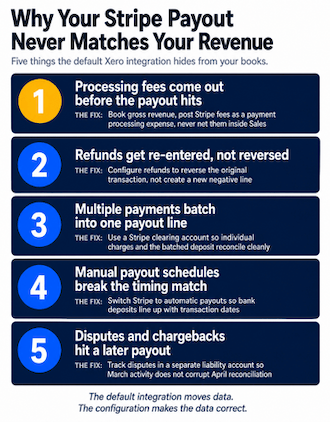
The fix is configuration, not a different tool. Use a Stripe clearing account so gross revenue and fees post correctly even when payouts batch. This is twenty minutes of configuration that saves twenty hours of cleanup at year-end.
How Do I Handle Deferred Revenue for SaaS Subscriptions in Xero?
If you sell annual subscriptions, this is the question that determines whether your books pass diligence.
A customer pays $12,000 in January for an annual subscription. Under ASC 606 and basic accrual accounting, you can recognize $1,000 in January and defer the remaining $11,000 as a liability. Each month, you unwind another $1,000 from deferred revenue into recognized revenue.
The default Stripe to Xero integration does none of that. It posts the full $12,000 as January revenue. Multiply by every annual customer, and you have a diligence problem.
You have four options:
Option Best For Trade-off Manual journal entries Pre-revenue, one annual customer Cheap, breaks the moment your bookkeeper takes a vacation Native middleware (Chargebee, Maxio) Multi-plan SaaS startup with prorations Strong rev rec, higher monthly cost Sync tool (Synder, Syft, ScaleXP) Pre-Series A with simple deferral needs Light setup, less flexible than Chargebee Custom n8n workflow Usage-based, hybrid contracts, custom logic Owned by you, requires real configuration skill The right answer depends on billing complexity, team size, and whether your CFO wants the audit trail to land directly in Xero. The wrong answer is doing nothing.
What Is the Best Tool to Integrate Stripe With Xero?
Founders ask AI engines for this comparison and get fifty options with zero guidance. Here is the honest version, ranked by stage:
Stage Recommended Tool Why Pre-revenue, simple billing Native Stripe to Xero Free, fine for one-product startups with monthly billing Pre-Series A, annual contracts Synder or Syft Handles fee splits and basic deferral, easy setup Series A, multi-plan SaaS Chargebee or Maxio True subscription billing with native ASC 606 Series A+, custom revenue logic n8n with custom workflow Flexible, transparent, owned by you Ecommerce alongside SaaS A2X accounting plus Synder A2X for ecommerce, Synder for Stripe The tool matters less than the configuration. We have seen Chargebee misconfigured worse than a default sync, and a clean n8n workflow outperform $30K of middleware.
How Do I Set Up Gusto + Xero So Payroll Posts to the Right Departments?
Payroll integration almost works out of the box and then disappoints you at the first board meeting.
Gusto's native Xero integration handles the basic journal entry. The configuration step every startup misses is department-level posting. By default, Gusto sends one big payroll number to a generic Wages account. Then your CFO asks you to break out R&D headcount for the SR&ED tax credit and you cannot do it without a manual reclassification.
The setup that actually works:
Build departments in Gusto that match your Xero expense accounts (R&D, Sales, Marketing, G&A, Customer Success).
Map each employee to a department in Gusto.
Configure the Xero integration to use department-level posting, not a single Wages account.
Split employer taxes from employee taxes so payroll taxes post separately.
Run one test payroll cycle and verify allocation in Xero before going live.
Same pattern works for Rippling. For ADP and Paychex (no native Xero integration), build the connection through n8n.
Why Do My Mercury, Ramp, and Brex Bank Feeds Keep Breaking?
Because they are not bank feeds. They are screen scrapers running through a third-party aggregator like Plaid.
This is not a Xero failing or a Mercury failing. It is the operational reality of fintech-to-accounting plumbing in 2025. Most fintech platforms route data through aggregator infrastructure that experiences rate limiting, credential rotation, or silent disconnection every few weeks.
What this looks like in your week: bank balances drift out of synchronization, transactions stop appearing, your bookkeeper notices three weeks later when reconciliation does not balance, and you spend a Saturday rebuilding feeds before close.
The fixes that work:
Use Mercury's direct Xero integration where available, including GL coding from inside Mercury.
Switch Ramp and Brex to native Xero connectors instead of generic bank feed aggregators.
Set up integration health monitoring so you know within hours, not weeks, that data has stopped flowing.
For high-volume startup accounting, build an n8n workflow that pulls transactions directly from each platform's API and posts to Xero on a schedule.
How Long Does It Take to Build the Full Stack?
Founders ask this expecting the answer to be a weekend, and it is definitely not. A correctly configured Xero stack with Stripe, Gusto, Ramp, and a synchronization tool typically takes six to eight calendar weeks of structured implementation work. Here is the realistic week-by-week breakdown:
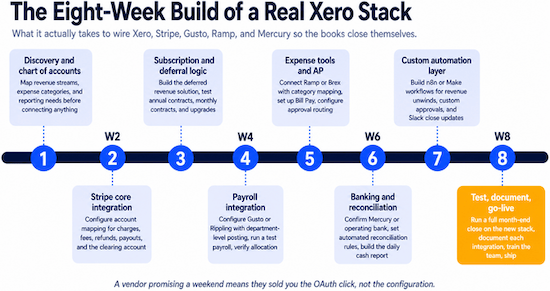
Week 1. Discovery and chart of accounts design. Map revenue, expense categories, and reporting needs before connecting anything.
Week 2. Stripe core integration. Account mapping for charges, fees, refunds, payouts, and the clearing account.
Week 3. Subscription and deferral logic. Test annual contracts, monthly contracts, and an upgrade scenario.
Week 4. Payroll integration. Configure Gusto or Rippling with department-level posting, run a test payroll.
Week 5. Expense tools and AP. Connect Ramp or Brex with category mapping, set up Bill Pay and approval routing.
Week 6. Banking and reconciliation. Confirm bank connections, set automated reconciliation rules, build the daily cash report.
Week 7. Custom automation layer. n8n or Make workflows for revenue unwinds, custom approvals, and Slack automation for close updates.
Week 8. Test, document, go-live. Run a full month-end close on the new stack, train the team, ship.
If a vendor tells you they can do it in a week, they are selling you the OAuth click, not the configuration.
Zapier vs Make vs n8n: Which Automation Tool for Xero Workflows?
Every stack hits gaps where no native integration exists. Three no-code integration solutions fill those gaps.
Zapier. Single-step connections between common tools. Salesforce closed-won creates a Xero contact. Quick, reliable, scales pricing fast as volume grows.
Make. Multi-step workflows with conditional logic. AP routing based on category and amount. Better visualization, more flexible, harder learning curve.
n8n. Complex workflows, high-volume automations, custom business logic, AI workflows, or self-hosted setups for data privacy. Charges per workflow execution, not per task, which keeps costs predictable as volume grows.
We use all three. Zapier for quick wins. Make for mid-complexity workflow optimization. n8n Workflow Automation and AI Agents for everything that needs custom logic at scale.
Five Integration Mistakes That Tank Your Integration ROI
The mistakes are predictable. We see them in eight out of ten audits.
Mapping all Stripe revenue to one income account. Looks fine on day one. Breaks the moment your CFO needs product-line revenue.
Skipping edge case testing. Refunds, partial cancellations, contractor payments mid-cycle, and disputed transactions are where integrations fail in production.
No alerting on silent failures. Stripe stops syncing for three days. Nobody notices until close.
Leaving historical data unmapped. New integrations start fresh from go-live. Your first year-over-year report becomes a mess.
Zero documentation of the configuration. The person who set it up leaves and nobody knows why deferred revenue posts to account 4250.
Every one is fixable in setup and expensive to fix later.
Can ChatGPT, Claude, or Perplexity Query My Xero Data Yet?
Technically yes, but with meaningful caveats.
Several MCP servers and middleware platforms now bridge AI assistants directly into Xero. CData, Coupler.io, and Breadwinner each offer methods for querying Xero through ChatGPT, Claude, or Perplexity. Xero itself recently launched JAX (Just Ask Xero), a generative AI companion that interprets natural language questions about your books.
Good for ad hoc lookups: "what was my software spend last month?" or "show me invoices over $5,000 still outstanding."
Not good for anything requiring multi-step reasoning across your full ledger, accuracy at the audit level, or anything where a hallucinated number could surface inside a board deck. Treat AI-on-Xero as a search and summary layer, not a replacement for your bookkeeper.
How to Spot a Silent Integration Failure
Integrations fail quietly almost every single time. The operational trick is to engineer them to fail loudly instead, which means deliberately configuring four categories of monitoring alerts:
Transaction volume alerts. If Stripe normally pulls 200 transactions a day and today you saw 20, something broke.
Payout reconciliation alerts. If your Stripe clearing account balance does not zero out within 48 hours of a payout, alert.
Payroll posting alerts. If payroll ran but the Xero journal entry did not post within an hour, alert.
Bank feed staleness alerts. If Mercury, Ramp, or Brex feeds have not updated in 24 hours, alert.
We build this monitoring into client stacks as part of MATAX™ CoreOps. Every alert has a Slack channel, a runbook, and an owner. Problems get caught the day they happen, not the week of close.
Frequently Asked Questions Founders Are Asking AI Engines
Why does everyone say Xero does not handle deferred revenue? Because Xero does not natively automate revenue recognition unwinds. You need middleware (Chargebee, Maxio, Synder, Syft, ScaleXP), a custom workflow, or manual entries to handle ASC 606.
Can Xero replace my accountant if the integrations are right? No. Xero is a system. Integrations move data correctly. You still need a human who knows ASC 606 and the difference between a clean reconciliation and a clean reconciliation that hides a problem.
Is A2X accounting still relevant if I use Stripe and not Shopify? A2X is built for e-commerce platforms. For Stripe-only SaaS startup operators, Synder, Syft, or ScaleXP fit better.
How do I prevent the Mercury bank feed from breaking again? Use Mercury's native Xero connector instead of Plaid-based bank feeds. Set up integration health alerts. For high-volume accounts, build a custom n8n workflow.
What does it cost to build this stack right? A pre-Series A SaaS startup typically needs $8K to $20K of setup work, plus monthly software costs of $300 to $1,500 across the integrations. We scope this in discovery so you have a real number, not a range.
The Stack Is the Backbone of Your Back Office Operations
Your accounting stack is only as good as the connections between its parts. Xero with disconnected tools is a $40 monthly subscription that produces unreliable numbers. Xero, with properly configured AI-powered integrations, is the back office operations engine for a successful business.
Getting it right takes both accounting depth and technical configuration skill. That combination is rare. It is what we do every day at MATAX.
If you are wiring this up yourself, use this article as a checklist. If you are tired of the spreadsheet mess and want it built once, correctly, that is what discovery is for.
Either way, stop pressing Connect and hoping. The default integrations are not enough. The configuration is the work.
Dawn Hatch is the Founding Partner of MATAX, a San Francisco-based Client Advisory Services firm focused on operational infrastructure, AI workflow automation, and Xero implementation for scaling startup operations. MATAX is a two-time Xero Partner of the Year and Xero's 2025 Advisory Innovator of the Year.
